
Everyone can read published risk assessments under Risk assessments. Safety Managers write them.
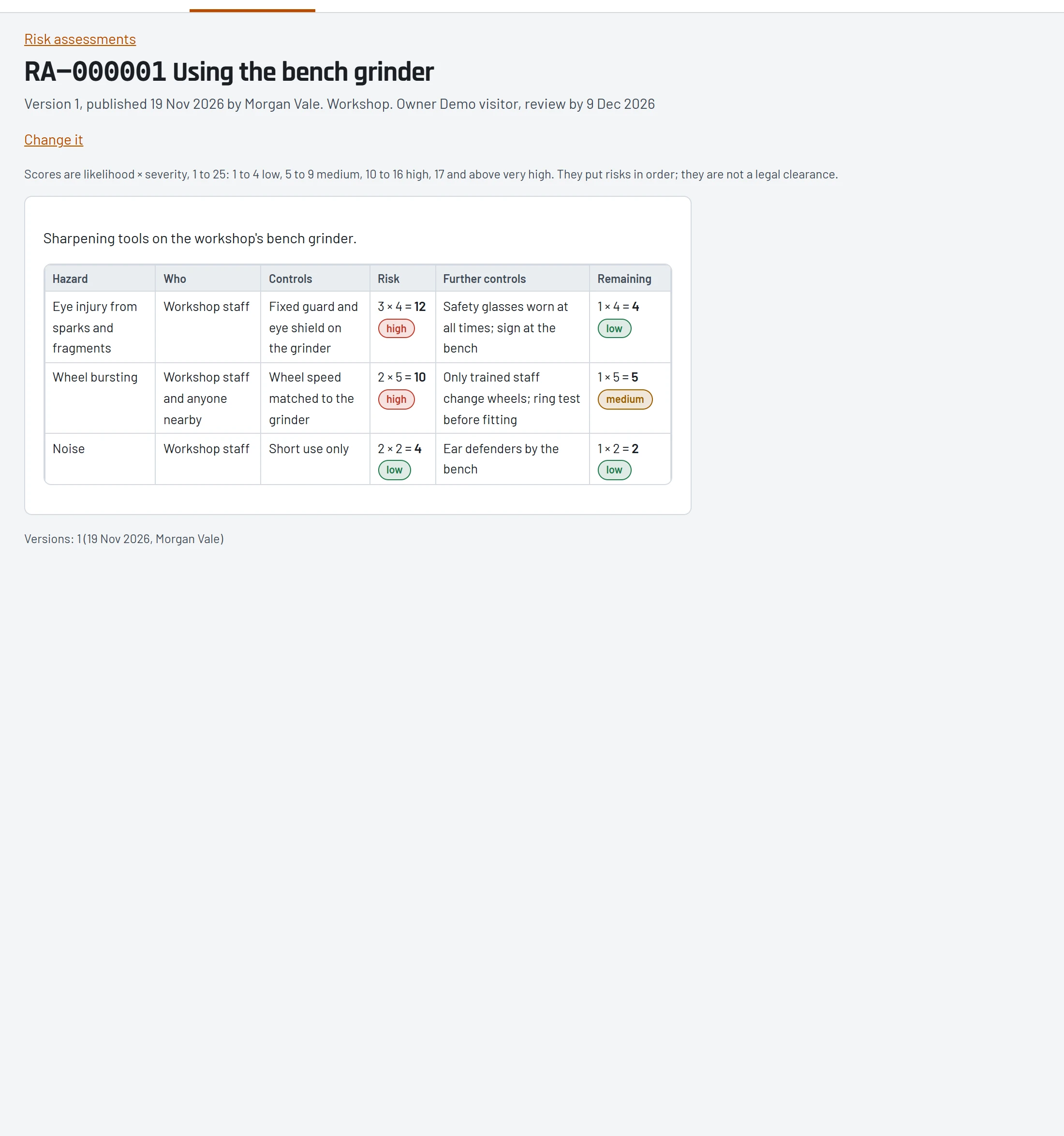
Each hazard shows who may be harmed, the controls, the risk, any further controls, and the risk that remains. Change it opens the draft for the next version.
To write one:
- Under A new risk assessment: what activity or place, type what it covers, and choose Start the risk assessment.
- Set the Title, Where (or Not one place), the Owner, Review by, and describe The activity.
- For each hazard (Add a hazard adds another):
- the Hazard, and Who may be harmed (groups, not names);
- the Controls in place, with Likelihood (1 to 5) and Severity (1 to 5);
- any Further controls, with Likelihood after them and Severity after them.
- Choose Save the changes, then Publish as the next version.
Scores are likelihood × severity, 1 to 25: 1 to 4 low, 5 to 9 medium, 10 to 16 high, 17 and above very high. They put risks in order; they are not a legal clearance.
As it stands shows the published version while you change the draft. Each version is kept, with who published it and when. The owner is told when it is due for review. Archive takes it out of use.
Was this helpful?