
An opportunity is something you hope to sell to a customer, with a forecast value and an expected close date. The pipeline shows where each one stands. The values are forecasts, as owners estimate them: never revenue.
Look at the pipeline
Choose Pipeline. It shows one pipeline at a time.
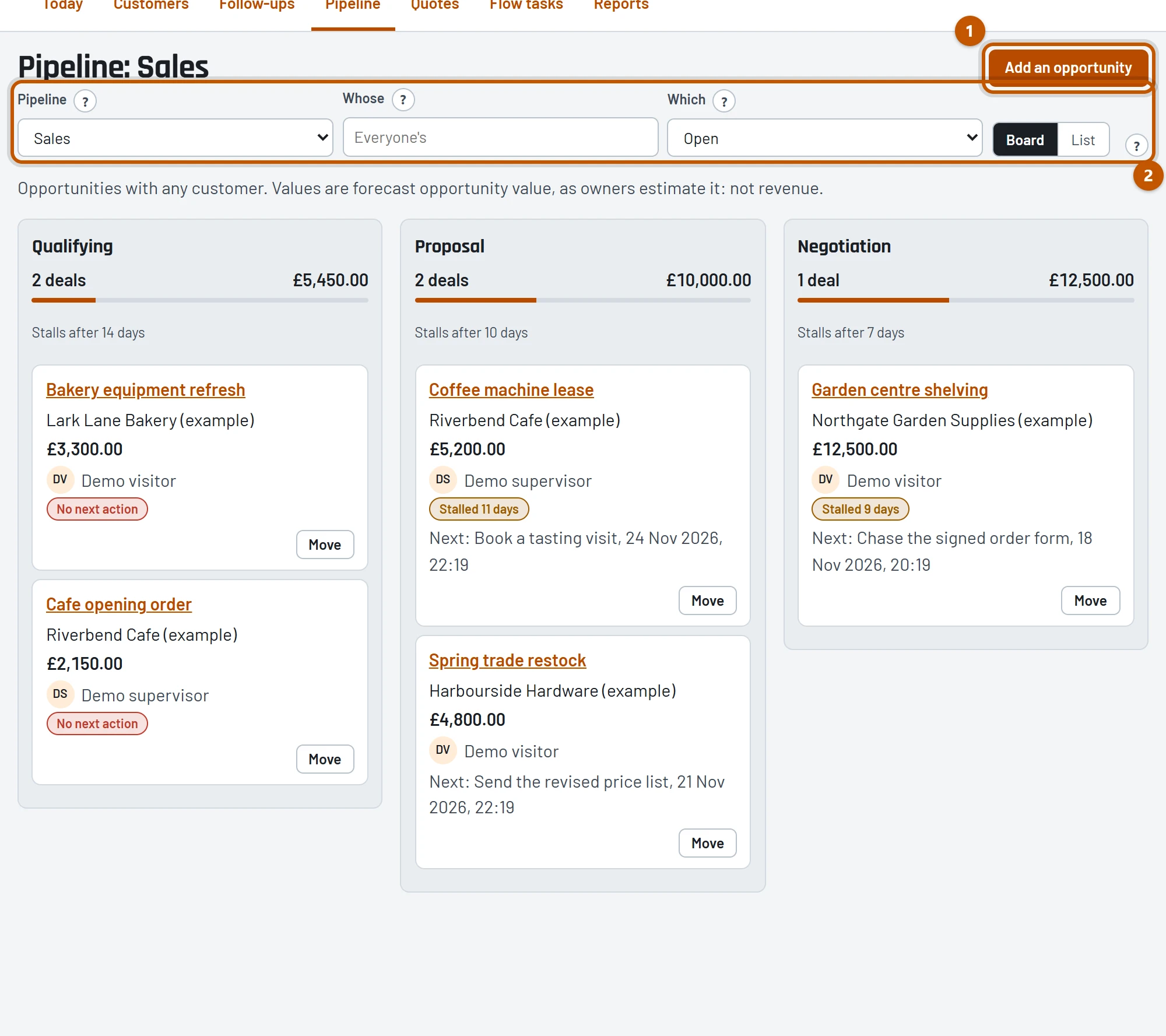
- Add an opportunity.
- The filters: which pipeline, and whose.
- Pipeline: choose which, if your organisation has more than one, such as Sales and Renewals.
- Whose: type a colleague's name, or leave it empty for everyone's.
- Which: Open, Won, Lost or All.
- Board shows a column per stage with the number of deals, their value and a bar for each stage's share. List shows them one under another.
Each card shows the title, customer, value, close date and owner, with flags such as Stalled 12 days or No next action. Select a card to open the opportunity, with its follow-ups and its stage history.
Add an opportunity
- Choose Add an opportunity on Pipeline or on the customer's page.
- Find the customer, then fill in the Title (required) and the Value (required), a forecast before tax.
- Optionally fill in the Currency, Expected to close and, for a Sales Manager or administrator, the Owner.
- If there is more than one pipeline, Pipeline says The one that suits the customer unless you choose another. Choose the Stage it starts in.
- Choose Add opportunity.
A new opportunity goes into the pipeline that suits its customer: one for the customer's tag, then one for businesses or individuals, else the default.
Move it on
- Choose Move on its card, or on the opportunity.
- Choose the stage To the stage. A won or lost stage closes it.
- When it closes, choose Why from your organisation's reasons.
- Choose Move.
To reopen a closed opportunity, move it back to an open stage. An opportunity stays in the pipeline it was made in.
Stalled
An open stage can have stall days. An opportunity with no activity for that long shows Stalled on its card and on Today. Logging an activity about it, completing one of its follow-ups, or moving it, starts the count again.