
Knowledge is where your organisation writes down what people need to know: how-to articles, and the policies people must read and confirm. Knowledge keeps text, not files, so what you read is always the current version.
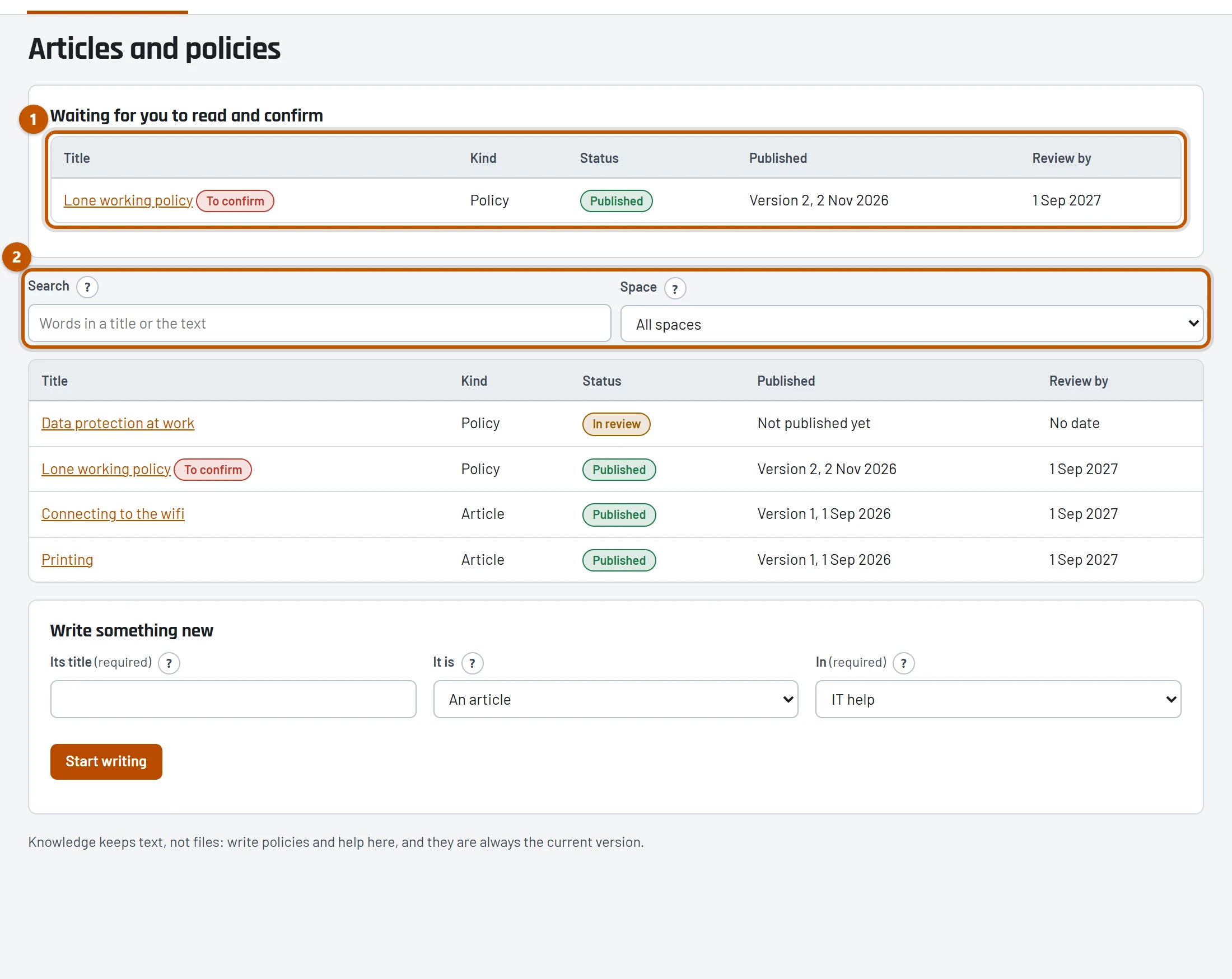
- Waiting for you to read and confirm, then every article and policy, with its kind, status, version and review date.
- Search and Space. Write something new is below, for Editors.
Articles and policies
Articles and policies lists what is published, by space. Search finds words in a title or the text; Space narrows it to one.
Waiting for you to read and confirm lists the policies that apply to you and that you have not confirmed yet.
The menu
- Articles and policies: the above.
- Connections, Settings and Audit: for the people who run Knowledge.
Access levels
| Access level | What it can do |
|---|---|
| Reader | Reads articles and policies, and confirms the policies that apply to them |
| Editor | Writes and publishes articles, and writes policies for approval |
| Approver | Approves policies for publishing (never their own), and sees who has confirmed them |
| Auditor | Reads everything, drafts and confirmations included, and the audit trail; changes nothing |
| Knowledge Administrator | Everything, with the spaces and the organisation's Knowledge settings |
What you are told
The bell tells you when a policy that applies to you asks you to read and confirm it, when a policy waits for your approval, when a policy you submitted is returned, and when something you own is due for review.
Was this helpful?