
Open a product from the list, or from anywhere it is named.
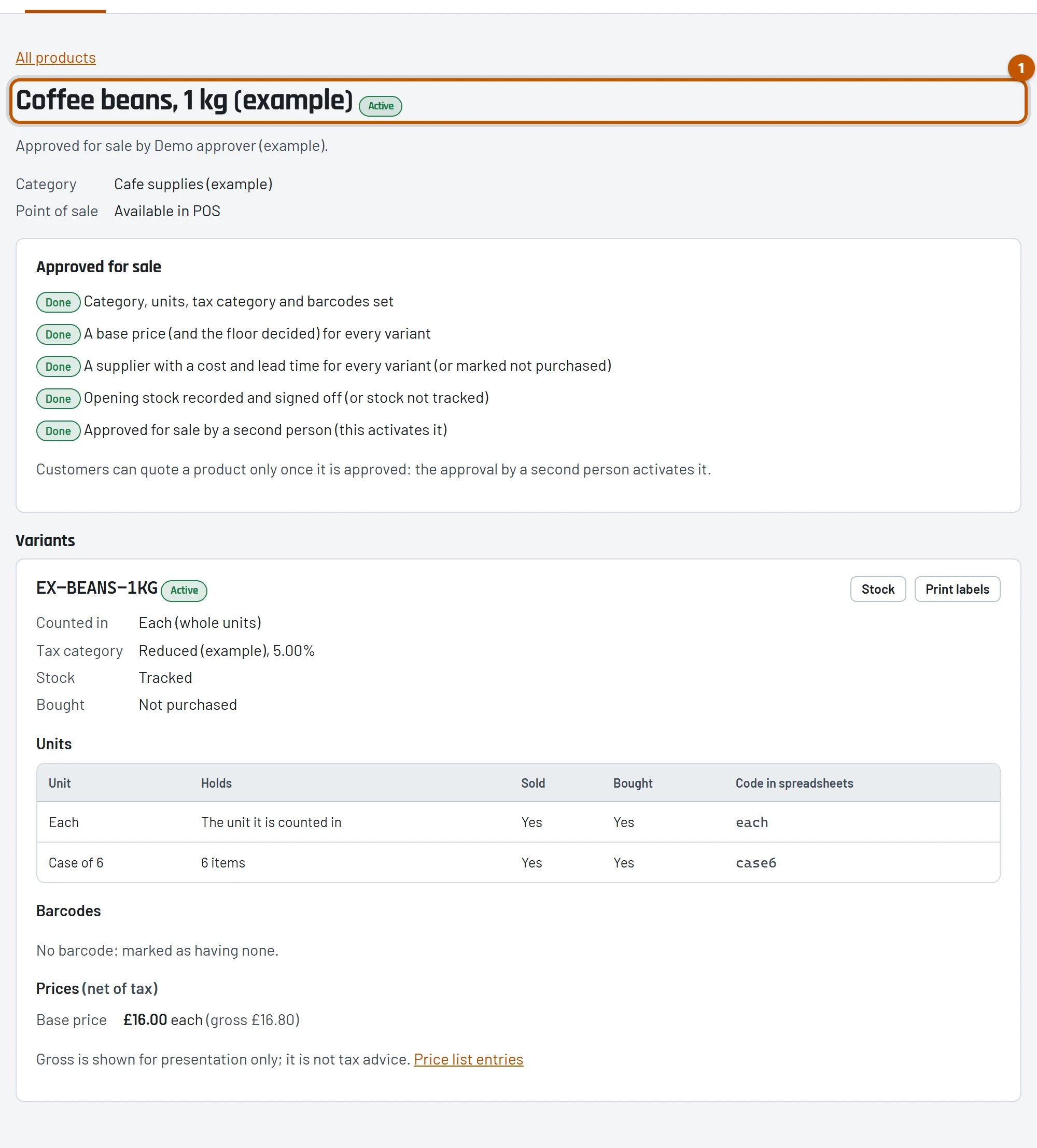
- The product: its name and status. Below are its category, whether it is in POS, the checks for approval, and each variant's units, barcodes and prices.
At the top
The product's name and status, then its Category, Supplier reference and Description. Edit the product's details changes them.
The checklist
A product goes on sale only when five things are done. The checklist says how far it has got, such as Ready to activate: 3 of 5, and what is still missing.
| Item | Done when |
|---|---|
| Category, units, tax category and barcodes set | It has a category, and every variant has a tax category with a rate in force and a barcode or Has no barcode ticked |
| A base price (and the floor decided) for every variant | Every variant has a base price |
| A supplier with a cost and lead time for every variant (or marked not purchased) | Every variant has a supplier item, or is marked Not purchased |
| Opening stock recorded and signed off (or stock not tracked) | Every variant that tracks stock has signed-off opening stock |
| Approved for sale by a second person (this activates it) | A second person has approved it |
Shortcuts sit on the open items:
- Open stock at zero: for a new product you hold none of. It records opening stock of zero at a sellable location; nothing is posted.
- Mark the rest not purchased: every variant with no supplier is marked as made here, or a service.
- Add a supplier: opens Suppliers.
An administrator can turn off the supplier and opening stock items in Settings. They then show Turned off.
Going on sale
- When the first four items are done, choose Ask for approval. The product is Waiting for approval, and the approvers are told.
- A second person with Approve Price Changes opens it and chooses Approve and activate, or Send back with a reason.
- Once approved, the product is Active, and Customers can quote it.
The approver cannot be the person who created the product, asked for its approval, last priced it or last changed it, unless second-person approval is off.
Later in its life
- Discontinue: it stays on record and on the orders already taken, but a new order with it waits for approval. Put back on sale reverses it.
- Archive: it leaves sale. Archiving is refused while the product holds stock, has opening stock staged, or is on an open order or purchase order. Restore as a draft brings it back.
Nothing is ever deleted.
Variants
Each variant has its own card: its SKU and options, what it is Counted in, its Tax category, whether it tracks Stock, its Reorder level, its Suppliers, Units, Barcodes and Prices. Average cost shows only to people who see costs.
- Edit this variant changes its SKU, options, tax category, reorder level and quantity, status and ticks.
- Add a variant adds another, such as a new colour.
- Stock opens its stock and ledger, and Print labels prints its labels.
See Units and packs and Prices, price lists and quantity breaks.