
A payee is a supplier as Finance pays it, made from its first invoice, or a claimant paid back through Finance. Choose Payees to see each with their sort code and account (masked), and whether the bank details are verified.
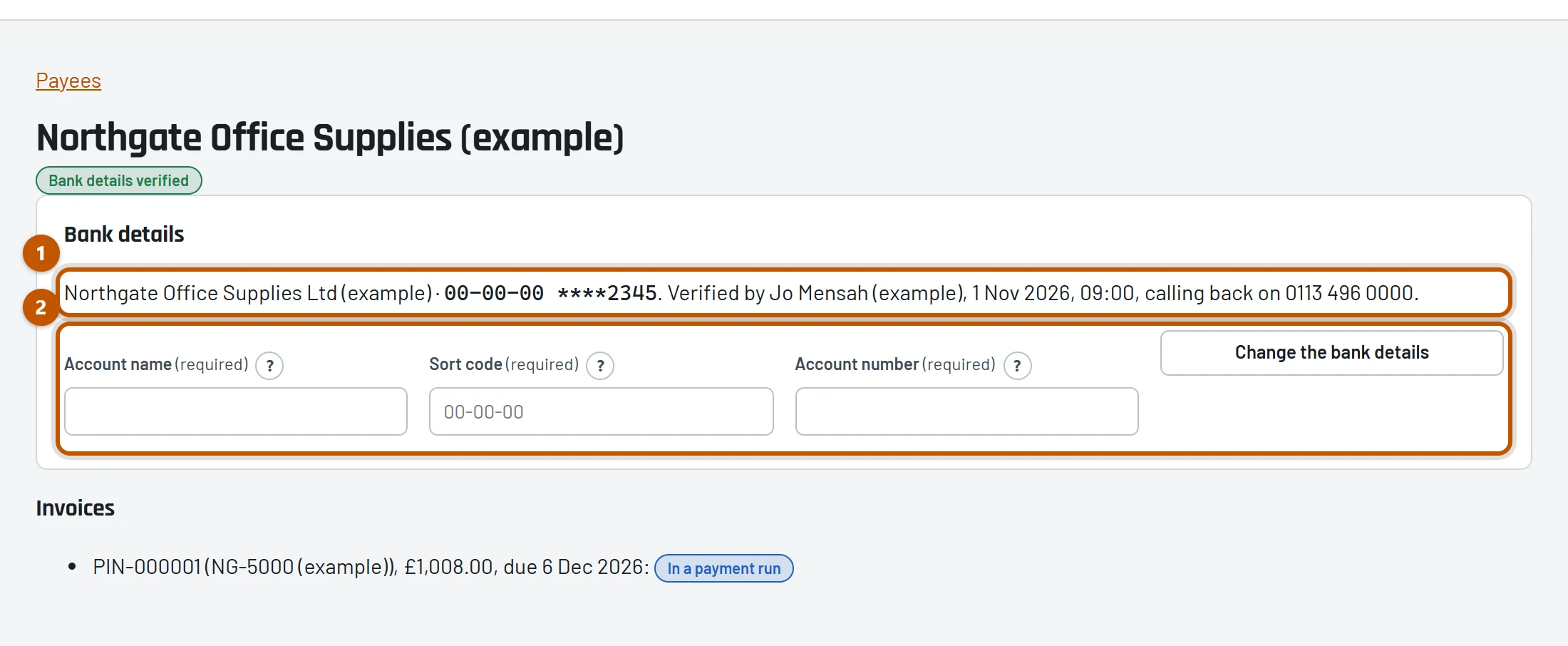
- The bank details: who verified them, when, and the number they called back on.
- The Account name, Sort code and Account number, then Change the bank details (Give the bank details for a payee with none yet).
Give or change the bank details
Open the payee and choose Give the bank details (or Change the bank details): the Account name, Sort code and Account number. They wait to be verified, and the payee is not paid until then.
Verify them
Someone else verifies them. Call the supplier back on the number in its own record, never one given with the change, and confirm the details. Give The number you called and choose Verify, or give a Reason and Refuse.
Bank details are held only in Finance: never in an event, an export, the audit trail or a notice.
Was this helpful?