
Each organisation is backed up every night: its applets' records and files, and what Core keeps about it. The page says how long daily and weekly backups are kept. Every backup is encrypted with a key of the account's own, destroyed if the account is deleted.
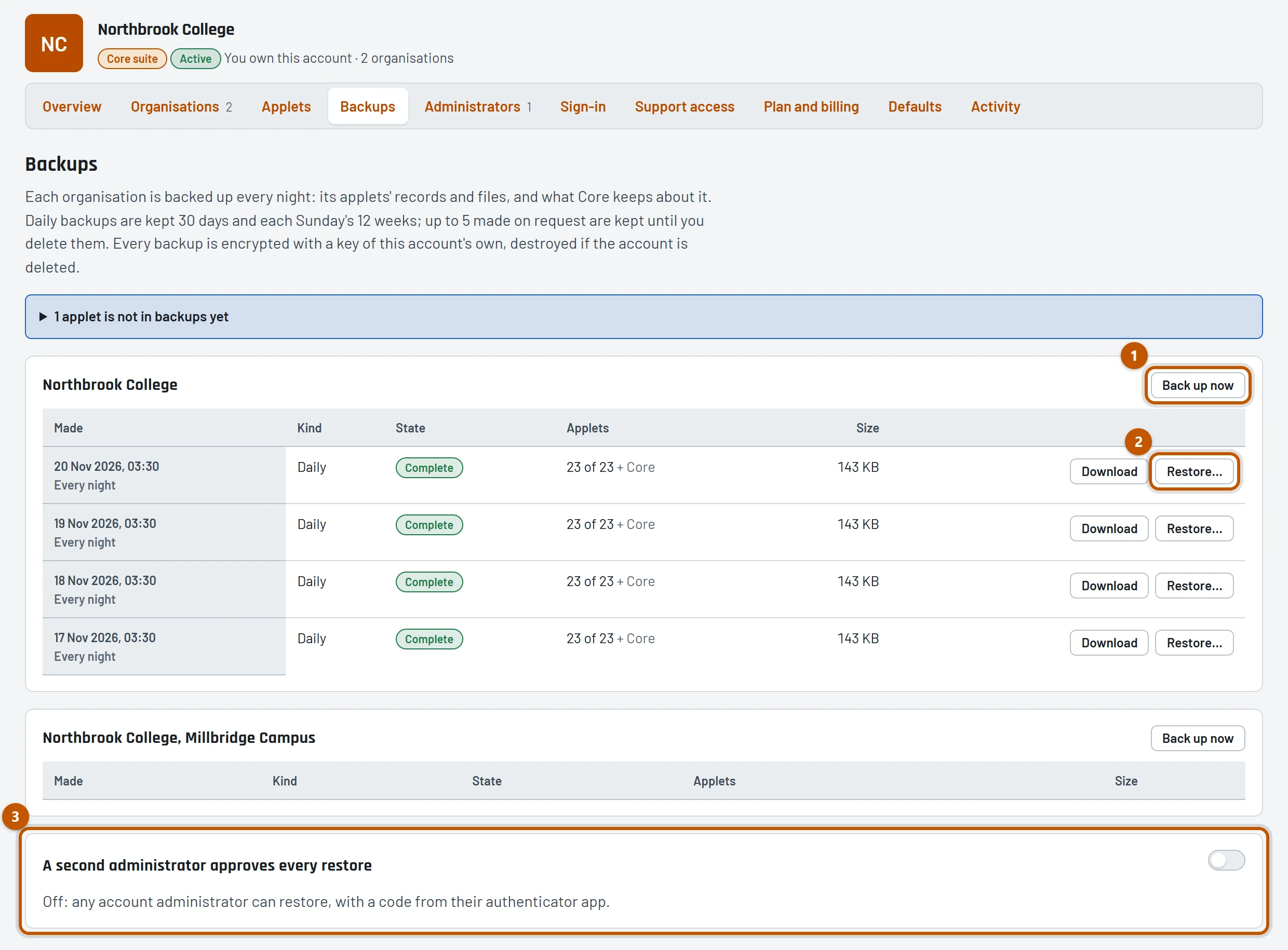
- Back up now makes one on request, kept until you Delete it. There is a limit to how many; the button says when it is reached.
- Restore… puts the organisation back as it was in that backup. Download keeps a copy as a file.
- A second administrator approves every restore: switched on, a restore one administrator asks for waits until another approves it.
Restore an organisation
- Choose Restore… beside the backup.
- Under What to put back, choose the applets (Every applet in the backup, or some), and whether to put back Core's records of the organisation, and its people and their access too.
- Type the organisation's name to confirm, and the Code from your authenticator app.
- Choose Ask to restore. If a second administrator must approve, they are emailed and see it under Restores waiting for approval, with Approve… and Decline.
First a copy of what is there now is made and kept, so a restore can be undone. While it runs, a minute or so, the organisation can be read but not changed.
A restore never puts back the activity log or any applet's audit trail; billing, the plan or the account's administrators; sign-ins, passwords or two-step sign-in; connections to outside systems; or anything already sent out, such as emails or submissions to HMRC.
Was this helpful?