
Inbox lists what is waiting for you. The number beside it in the menu counts what needs you now, and the bell in the bar tells you when something new arrives.
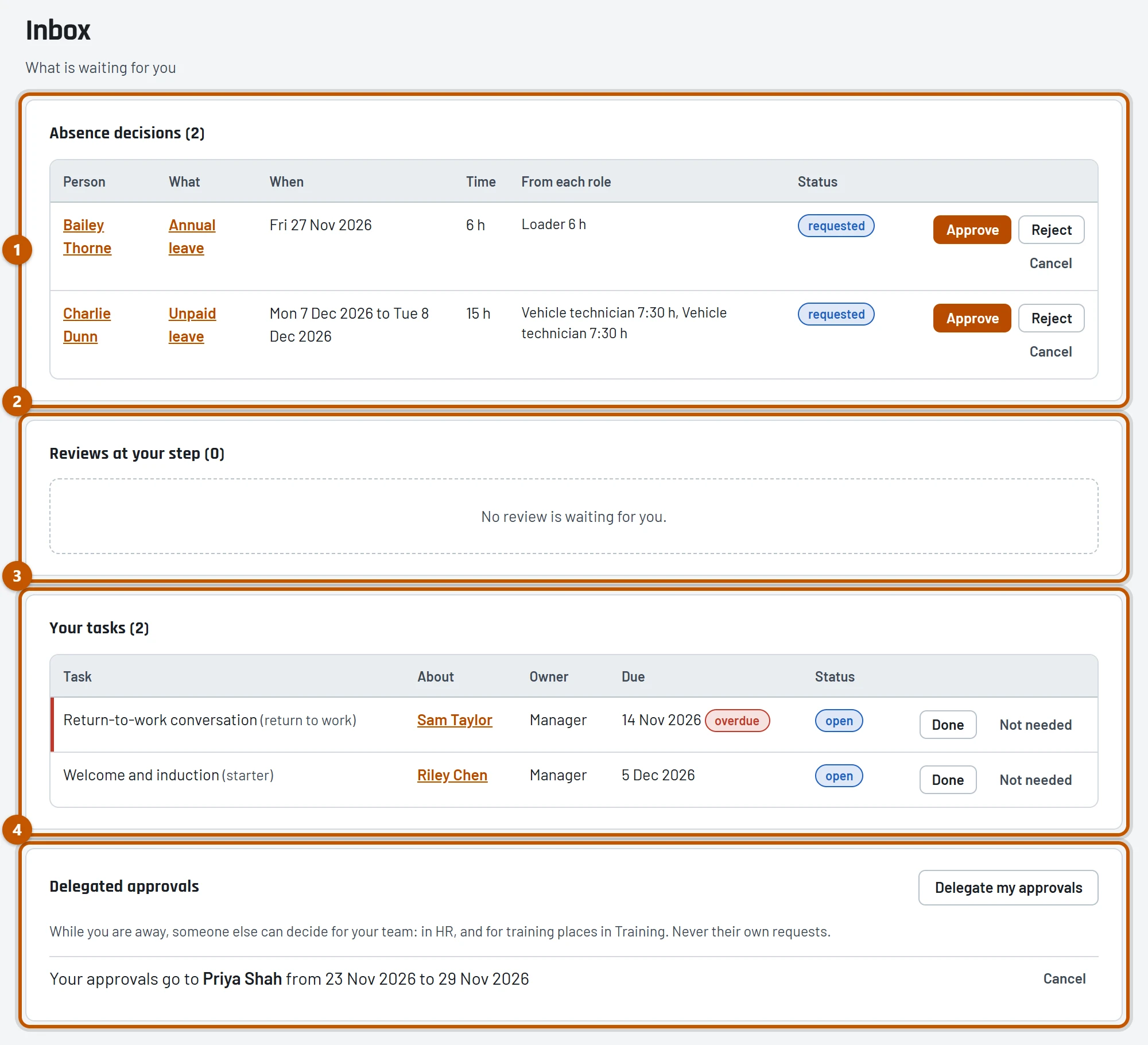
- Absence decisions: leave and sickness waiting for you to decide, with the hours from each role. See Decide leave and sickness for your team.
- Reviews at your step: reviews waiting for your self-reflection, your writing or your acknowledgement.
- Your tasks: checklist tasks you own, such as a return-to-work conversation or a new starter's induction. Choose Done or Not needed; an overdue one is marked.
- Delegated approvals: hand your decisions to someone while you are away, and see who has handed theirs to you.
Also in the inbox
Depending on your access level you may also see:
- Tasks from Flow and Payroll: steps of your organisation's processes that are waiting for you, and anything Payroll has chased because a pay run needs it fixed before its pay date. New tasks appear without reloading the page.
- New starters from Recruitment: people hired in Recruitment, for HR to make starters. See Set up a new starter.
- Pay changes to approve: proposed pay changes waiting for a second person. See Change a role's terms or pay.
Good to know
- Only what is yours. An employee's inbox has their own reviews and tasks; decisions appear only for those who make them.
- Nothing to do? Each section says so.
Was this helpful?